Most organisations do not fail at automation because the tools are weak, they fail because they automate the wrong work, in the wrong way, with no operational guardrails. The result is a portfolio of brittle bots, spreadsheet-driven exceptions, and a growing support burden.
Done well, business process automation (BPA) reduces cycle time, improves accuracy, and frees teams from repetitive tasks. Two approaches dominate 2026 automation roadmaps:
- RPA (Robotic Process Automation) for UI-driven work that mimics how a person clicks and types.
- Low-code platforms for building workflows, forms, and integrations faster than traditional software delivery.
This article explains how to combine RPA and low-code sensibly, where each fits, and how to run automation like a production system.
What “business process automation” actually includes
BPA is not one product. It is a set of capabilities that remove manual work from end-to-end processes, often across multiple systems.
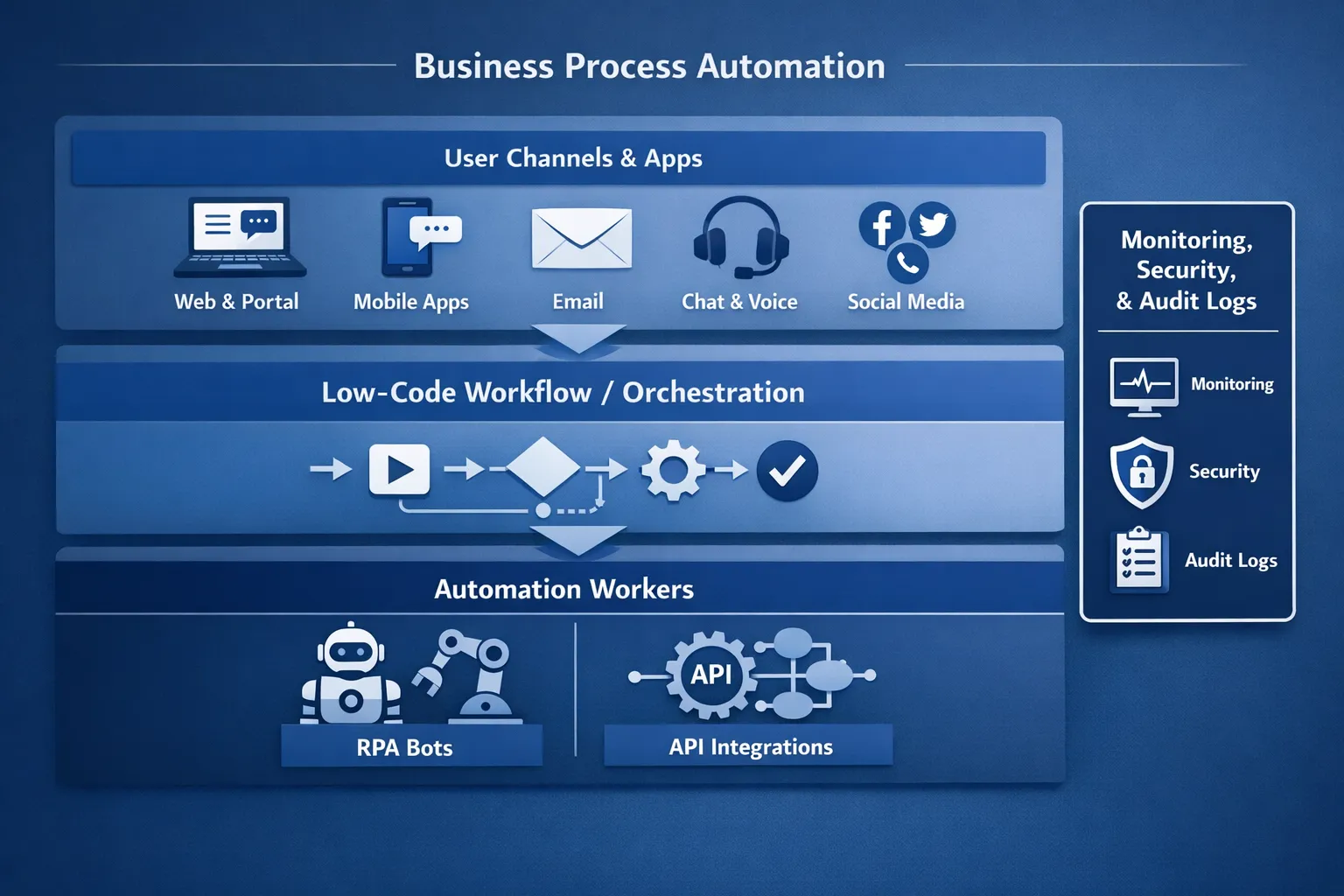
In practice, BPA usually includes:
- Workflow orchestration (routing, approvals, SLAs, escalations)
- Integrations (APIs, events, message queues, iPaaS connectors)
- Human-in-the-loop steps (task queues, exception handling)
- Automation workers (RPA bots, scripts, serverless functions)
- Observability and auditability (logs, metrics, traceability)
The mistake is treating RPA or low-code as the whole story. They are components.
RPA vs low-code: where each fits (and where it does not)
RPA is great when you cannot integrate cleanly. Low-code is great when you can model a workflow and integrate through supported connectors or APIs. Many successful programmes use both, but with clear boundaries.
The core trade-off: UI automation vs system-level automation
- RPA automates the user interface, so it breaks when screens, selectors, or timing change. It also struggles with complex exception handling unless you invest heavily.
- Low-code typically orchestrates work and integrates through supported connectors, services, or custom APIs. It is more maintainable than pure UI automation when you can access stable interfaces.
A practical decision table
| Criteria | RPA is a strong fit | Low-code is a strong fit | Prefer API-first or custom engineering |
|---|---|---|---|
| Primary constraint | No API, legacy system, VDI, desktop apps | Need workflows, approvals, case management | High scale, complex logic, strict latency or reliability |
| Change frequency | Low UI change tolerance is required, but apps change slowly | Process changes frequently and needs rapid iteration | Interfaces change often, requires strong test automation and CI/CD |
| Volume and throughput | Low to medium | Medium | High, especially batch or event-driven |
| Audit and compliance | Possible, but needs careful design | Usually better built-in governance | Required controls demand full engineering and security SDLC |
| Long-term maintainability | Medium to low | Medium to high | High (if engineered well) |
A common pattern is to use low-code as the orchestration layer (tasks, approvals, SLA timers) and use RPA only for the “last mile” where a system cannot be integrated any other way.
Where organisations get the best ROI from RPA and low-code
Automation ROI tends to be highest in processes that combine three properties:
- High repetition (daily or weekly workload)
- Low ambiguity (rules are clear enough to codify)
- Measurable outcomes (time, cost, errors, compliance)
Here are practical categories that consistently deliver results.
Finance and operations
Examples include invoice ingestion, three-way matching support, supplier onboarding, reconciliation, and payment status updates. Low-code workflows help keep approvals and exceptions visible, while RPA can handle portal-based tasks when suppliers or banks lack integrations.
HR and employee services
Joiners-movers-leavers processes are ideal: account requests, access provisioning requests, payroll updates, benefits changes, and policy acknowledgements. Many HR systems have APIs, so low-code plus integrations often outperforms UI-driven bots.
Customer operations and backoffice
Ticket enrichment, refunds, address updates, KYC checks, and customer notifications benefit from orchestration, templates, and audit trails. In regulated environments, traceability matters as much as speed.
An example of a domain where automation is operationally critical is iGaming, where onboarding and payments must work reliably at scale. If you are building in that space, a modular iGaming platform can reduce the custom surface area you need to automate by providing integrated building blocks (payments, compliance, backoffice operations) that your workflows can orchestrate.
IT and internal platform processes
Business process automation is not only “business”. IT teams automate access requests, environment provisioning, certificate renewals, incident triage, and compliance evidence collection. When these automations touch production systems, they should be treated with the same discipline as any other service.
The delivery approach that avoids “bot sprawl”
Successful programmes look less like a one-off automation project and more like a product rollout.
1) Discovery that goes beyond process mapping
Process mapping is necessary, but insufficient. You also need:
- A baseline (cycle time, manual effort, error rate, rework rate)
- A clear definition of done (what is automated, what remains human)
- An exception taxonomy (what can fail, and what happens next)
- A data classification pass (PII, financial data, credentials)
If you cannot explain the exceptions, you are not ready to automate.
2) Pick an “automation unit” that is testable
Avoid automating an entire end-to-end process in one go. Instead, identify a unit that can be validated and monitored.
Good automation units usually:
- Start with a clear trigger (form submission, email, event, scheduled run)
- Touch a limited number of systems (1 to 3)
- Have deterministic rules (or explicit human approvals)
- Produce an auditable output (case record, log entry, status update)
3) Build with production-grade engineering guardrails
Even in low-code and RPA, you want software-engineering basics:
- Version control for workflows and bot artefacts
- Separate environments (dev, test, prod) with promotion rules
- Automated tests where feasible (especially for integrations)
- Release notes and rollback plans
Many “low-code failures” are actually release-management failures.
Architecture patterns for combining low-code and RPA
Pattern A: Low-code orchestrates, RPA executes
In this pattern:
- Low-code owns the process state (what step we are on)
- RPA is invoked as a worker for UI tasks (download a report, update a portal)
- All exceptions return to the workflow layer for triage
This reduces bot complexity and keeps humans in control of edge cases.
Pattern B: API-first with RPA as a temporary bridge
If a system is expected to modernise, RPA can be a bridge.
- Build the workflow and data model now
- Use RPA only for the legacy UI steps
- Replace the RPA step with an API integration later
The key is to design the workflow so the RPA worker is a replaceable component.
Pattern C: Event-driven automation for scale
For high-volume automations (e.g., millions of events), RPA is rarely the right tool. Prefer:
- Events (queues, streams)
- Stateless workers (containers, serverless)
- Idempotent handlers (safe retries)
Low-code can still be useful for human approvals and case management, but the execution path needs scalable engineering.
Security, compliance, and auditability (the non-negotiables)
Automation moves fast, but regulators and attackers move faster. Two risk categories show up repeatedly.
Credentials and identity
RPA bots often need privileged access. Treat bot identities like service accounts:
- Least privilege access
- MFA where possible (or compensating controls)
- Credential rotation
- Central secrets management
For control frameworks and audit language, mapping your automation controls to established standards like NIST SP 800-53 Rev. 5 helps keep risk discussions grounded and actionable.
Data protection and records
If workflows touch personal data, design for data minimisation, retention, and access control from day one. In the UK, the ICO’s UK GDPR guidance is a practical baseline for obligations and terminology.
Also consider:
- Audit logs: who approved what, when, and why
- Evidence capture: change history for workflows and bot logic
- Segregation of duties: build vs approve vs deploy
Measuring success: KPIs that prove value (and prevent self-deception)
Automation programmes often over-index on “hours saved”. That metric is useful, but incomplete. You also need reliability and customer impact.
| KPI | What it tells you | How to measure it |
|---|---|---|
| Cycle time | Speed from request to completion | Timestamp start and end at workflow layer |
| First-time-right rate | Quality and rule clarity | % of cases completed without rework |
| Exception rate | Process stability and edge cases | Exceptions per 100 runs, categorised |
| Automation coverage | Adoption | % of volume routed through automation |
| Mean time to recover (MTTR) | Operability | Time from failure to resolution |
| Cost per case | Unit economics | Platform costs + labour for exceptions |
| Audit readiness | Compliance maturity | Ability to reconstruct decisions and changes |
A strong discipline is to run automation like an SRE service: set targets (for example, error budgets for failures), then improve systematically.
Operating automation at scale: treat it like a production service
The day you deploy an automation is the day you become responsible for it.
Observability for workflows and bots
At minimum, you want:
- Central logs with correlation IDs per case
- Metrics: runs, failures, retries, queue length, latency
- Alerting on symptoms (failure spike, backlog growth), not noise
- Dashboards that a non-developer can read
Runbooks and support model
Define who does what:
- First-line triage (business ops, shared services, or IT)
- Second-line engineering (workflow/RPA builders)
- Third-line platform support (identity, network, cloud)
If you cannot route incidents and changes cleanly, your programme will slow down under its own maintenance load.
Common pitfalls (and how to avoid them)
Automating a broken process
If the process is full of workarounds, automation will hard-code those workarounds. Fix the process first, or automate only the stable sub-steps.
Using RPA where an API integration is available
UI automation is usually the most brittle option. If an API exists, consider using it. Many organisations have learned this the hard way when UI changes force emergency bot repairs.
Treating low-code as “no-code governance”
Low-code accelerates delivery, but it also accelerates mistakes. Use environments, approvals, and change control appropriate to your risk profile.
Where Tasrie IT Services fits in
Tasrie IT Services helps teams implement automation that is robust, measurable, and maintainable, not just fast to demo. That usually means:
- Identifying processes where automation will genuinely reduce cost and risk
- Designing secure integration paths (API-first where possible)
- Implementing CI/CD-style controls for automation assets (promotion, rollback, traceability)
- Operating automations with monitoring and incident playbooks
If you are deciding between RPA, low-code, and API-first automation, a short discovery and architecture review can prevent months of rework and a growing bot maintenance backlog. Use our free Automation ROI calculator to estimate your potential savings from streamlined business processes.